
WordFinder by YourDictionary
LoveToKnow MediaWord
4.51.63K Reviews
- Version
- 7.8.16
- Installs
- 500.00K
- Age Rating
- Everyone
Screenshots
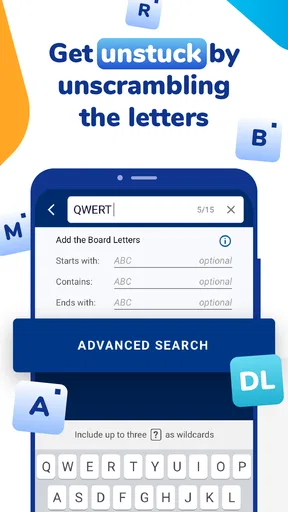
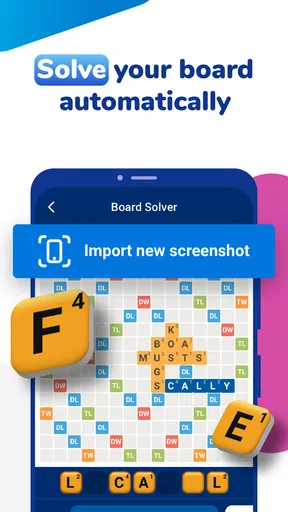
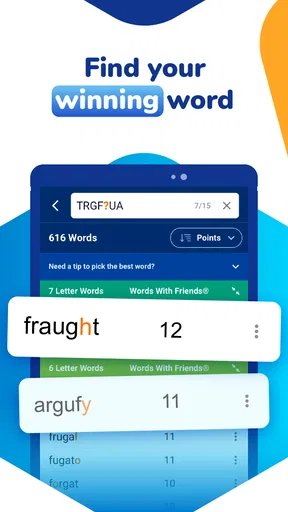
Our Review of WordFinder by YourDictionary
 Analysis by Appyee
I opened WordFinder by YourDictionary expecting a quick utility for difficult word-game turns, but it feels more useful when treated as a companion for thinking rather than a button that simply hands over an answer. It is a free word game in the category, made by LoveToKnow Media, and its central purpose is clear: help players work through letter combinations for games such as Words With Friends, Scrabble, and similar formats. I found that simple focus refreshing because the app does not need a large fictional world or complicated presentation to create a recognizable mood. Its setting is the language itself.
That focus also makes the app easy to understand. If I have a group of letters, a partial pattern, or a stubborn turn where nothing seems to fit, I can use the tool to explore possibilities instead of staring at the same tiles. It is available at no cost, carries an Everyone content rating, and has reached over 500 thousand installs. Those details match the kind of audience it serves: casual players, families, puzzle fans, and competitive word-game users who want help without committing to a separate premium game.
The public response is strong, with an average rating of 4.5 from around 6.5 thousand ratings and roughly 1.6 thousand written reviews. I do not see that as proof that every player will enjoy it, but it does suggest that the basic promise is landing for many people. My own reaction is more qualified: it is most satisfying when I use it to inspect language, find a better move, or learn why a combination works. It is less satisfying if I use it mechanically after every turn and remove all uncertainty from the game I am playing.
How the language becomes the setting
The app’s strongest artistic choice is also its most practical one: it turns vocabulary into the environment. There is no need for a map, characters, or decorative story because the changing arrangement of letters supplies the tension. A short group of common letters can feel restrictive, while an unusual combination invites experimentation. That gives each search a small sense of discovery, even though the interface is built around a straightforward word-finding task.
I especially like this approach for players who enjoy the texture of words. A solver can reveal familiar words that were temporarily hidden by a poor arrangement, but it can also surface less obvious possibilities that encourage me to think about prefixes, suffixes, plural forms, and letter placement. The result is not just “find something that fits.” It can become a compact vocabulary exercise, provided I pause to examine the suggestions instead of selecting the first usable result.
The language-focused setting also explains why this tool works across more than one word game. Different games may reward different lengths, patterns, or scoring habits, but the underlying problem remains similar: turn a limited collection of letters into a legal or useful word. That makes the app more flexible than a single-game helper designed around one board or one ruleset. I can bring the same habit of checking patterns into several games rather than learning a completely different companion tool for each one.
There is a useful distinction here between solving and learning. If I am playing casually with friends and only want to escape an awkward turn, the app can be a fast answer generator. If I am trying to improve, I get more from treating each result as a clue. After finding a word, I can look at its structure and ask what other endings might work with the same letters. I can also note recurring letter pairs that I tend to overlook. That workflow turns a one-time hint into something I may remember during a later match.
Using the tool without flattening the game
My preferred routine is to make an honest attempt first. I look for obvious short words, consider whether a longer word can be formed, and check whether the letters suggest a familiar ending. Only then do I use the solver to compare my idea with other possibilities. This preserves the small puzzle-solving moment that makes word games enjoyable while still giving me a way out of a dead end.
Another practical approach is to use it after a match rather than during every turn. I can revisit a difficult rack, see what I missed, and build a personal list of patterns that repeatedly cause trouble. That is more valuable than blindly copying suggestions because it targets my actual weaknesses. For example, I may discover that I overlook words built around a common suffix, or that I fail to recognize how a single flexible letter changes several options.
This matters for fairness and enjoyment. A solver can be helpful when everyone in a casual group accepts that kind of assistance, but it can undermine the experience when opponents expect unaided play. I would decide on the ground rules before using it in a shared match. For solo practice, vocabulary study, or a friendly game where hints are welcome, it fits naturally. For a serious contest based on independent play, I would leave it closed.
Sound, rhythm, and the feel of a quick search
WordFinder is not a sound-driven game in the way an arcade title or adventure game is. Its mood comes from the rhythm of searching: enter or inspect a letter arrangement, scan the results, compare options, and return to the board or puzzle that started the question. That loop is quiet and functional. I found that appropriate because the app’s job is to keep attention on language rather than distract me with effects.
The pacing is best when I already know what I need to check. A difficult turn can be resolved quickly, so the app works well in the middle of a casual game where I do not want a long interruption. It also supports a slower rhythm when I am exploring. I can linger over possible words, test different arrangements, and think about why one result is more useful than another. That range makes it suitable for both a rushed player and someone using it as a vocabulary aid.
There is a trade-off in this restrained presentation. Players who want a lively game layer, dramatic feedback, or a strong sense of progression may find the experience plain. The app is not trying to replace the atmosphere of the word game on the other side of the search. Instead, it acts like a quiet desk beside it. I appreciate that separation, although it means the emotional payoff depends on what I bring to the task.
In everyday use, I can imagine opening it during a short break, entering the letters from a friend’s word-game challenge, and finding a direction before the conversation moves on. I might also use it while helping a younger player who knows some letters but cannot see how they combine. Because the content rating is Everyone, it feels appropriate for broad household use, though I would still treat the solver as a learning aid rather than an automatic answer machine.
The current version is 7.8.16, and the listed minimum operating system is 7.1. That makes the app accessible to people using older compatible devices, which suits its lightweight, focused role. I would still keep the software updated when an update is offered, especially for a utility that I may open briefly and expect to respond smoothly. The important point is that the experience does not demand a modern gaming phone to make sense; its appeal comes from the word task itself.
Why the mechanics fit several word-game habits
The central mechanic is simple enough for a first-time user: use the available letters and clues to investigate possible words. That simplicity is a strength because I do not have to learn a new game before receiving help. It also gives the tool a wider use case than a traditional dictionary. A dictionary helps me understand a word I already have in mind, while this kind of solver starts with uncertainty and works toward candidates.
Compared with guessing directly inside Words With Friends or Scrabble, the advantage is organization. Instead of mentally rearranging the same tiles over and over, I can examine the letter problem from another angle. That can save time and reduce frustration when the board has created an unusual combination. Compared with a general web search, the dedicated format is more appropriate because I am looking for playable word possibilities, not a broad explanation of language.
Still, I would not call it a replacement for the games themselves. It does not create the satisfaction of placing a word on a board, responding to an opponent, or managing a match over time. Its role is closer to preparation, checking, and practice. If I want competition, social interaction, or a complete puzzle loop, I should use the main word game and keep this as an optional companion.
One of the more useful trade-offs is speed versus understanding. A quick search is ideal when I am stuck and the turn is becoming tedious. But if I accept the strongest-looking result without checking its structure, I may improve the current score without improving my play. I get better value by comparing several candidates and noticing what they share. This is especially helpful for recognizing how a difficult rack can be approached through word families rather than isolated guesses.
Another insight is that the app can help with board preparation, not only emergency turns. Before starting a session, I can practice with a handful of awkward letter combinations and see which patterns repeatedly produce options. That gives me a small warm-up and may make me faster at spotting possibilities later. It is a more deliberate use than opening the solver only when I am already frustrated.
There are limits to relying on any helper. Word-game rules can differ, and a word that looks promising in a general search may not suit the exact dictionary or ruleset being used in a particular match. I would therefore treat suggestions as candidates to check against the game I am actually playing, especially when a move matters. The app can narrow the search, but it cannot replace knowing the rules of the board, the scoring system, or the expectations of the people playing with me.
Who will get the most from it
I would recommend it to players who enjoy word games but dislike being trapped by one unproductive turn. It is also a good fit for people building vocabulary, parents helping children explore spelling, and casual players who want a second opinion without installing a large, unrelated game. The free entry point makes it easy to try, while the broad age rating keeps the audience open.
More experienced players may appreciate it for analysis rather than rescue. Reviewing missed possibilities after a match can reveal habits that are difficult to notice while playing. I find that use more rewarding because it turns the app into a training mirror. It shows where my attention narrowed too quickly and gives me material to remember for the next session.
I would skip it if I am looking for a complete standalone word adventure with characters, visual progression, or an elaborate soundscape. I would also avoid making it part of every competitive turn if the challenge for me is independent recall. In those situations, a built-in practice mode, a paper word list, or simply playing without assistance may be better. The app is strongest when it supports a word-game routine, not when it replaces the reason I play.
There are optional in-app purchases priced from $0.99 to $29.99 per item. Since the app can be used for free, I would begin without paying and decide only after understanding how often I use it and whether any optional extras genuinely improve my routine. That approach is particularly sensible for occasional players who may need help only once in a while.
My atmosphere verdict after using it
WordFinder by YourDictionary creates a coherent mood by refusing to overdecorate its purpose. The setting is a changing landscape of letters, the sound and rhythm are defined by quiet searching, and the pacing moves from instant assistance to slower vocabulary exploration depending on how I use it. The mechanics remain visible throughout, which is important: this is a word helper, not a disguised adventure game.
I like the app most when I use it as a bridge between frustration and understanding. It can get me past a blocked turn, but its better contribution is showing me how I missed the answer. That makes the experience more personal than simply copying a result. I can use it to prepare, review, teach, or settle a casual puzzle without asking it to become something it is not.
The main caution is ethical and practical rather than technical. If I use a solver constantly in a match where everyone expects unaided play, I am changing the challenge instead of meeting it. If I use it openly for practice or friendly assistance, it becomes a useful part of the hobby. That distinction should guide the decision more than the promise of finding a high-scoring word quickly.
With its 4.5 average, free access, Everyone rating, and support for older compatible operating systems, it is an approachable choice for a wide range of word-game fans. LoveToKnow Media has kept the concept focused, and that focus is exactly why it works. I would install it for difficult turns, vocabulary practice, and post-game analysis, while keeping a little restraint so the original puzzle still belongs to me.
Verdict
Strengths of WordFinder by YourDictionary
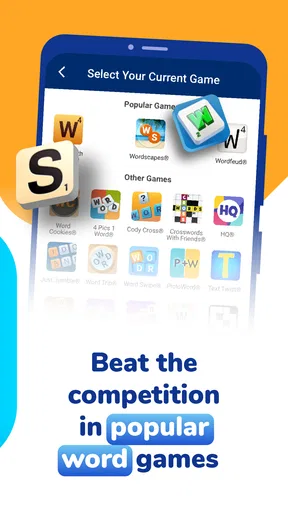
- Supports multiple word games, including Scrabble and Words With Friends.
- Offers word definitions to help verify unfamiliar or disputed entries.
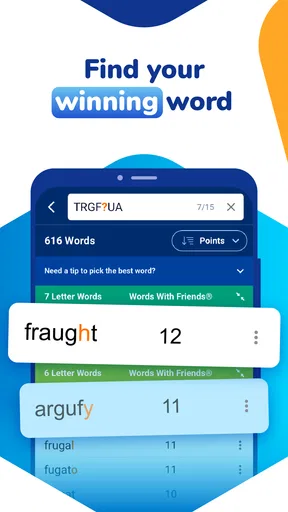
- Includes an anagram solver for finding playable words from available letters.
- Useful for improving vocabulary while practicing word-game strategies.
- Clean layout makes searches quick and easy on mobile devices.
Limitations of WordFinder by YourDictionary
- Some advanced tools or features may require a subscription.
- Advertising can interrupt the experience for users on the free version.
- Suggested words may not match the exact dictionary rules of every game.
- Solver results can reduce the challenge if used too frequently.
- Requires an internet connection for many lookup and search functions.
Similar Picks in This Category
View All
Word Search - Word Puzzle Game
Bluetile4.8

Word Search Quest - Puzzles
Blackout Lab4.8

CodyCross: Crossword Puzzles
Fanatee, Inc.4.7

Words of Wonders: Crossword
Fugo Games4.9

Wordscapes: Word puzzle game
PeopleFun4.7

Word Search Explorer
PlaySimple Games4.9
Frequently Asked Questions
What is WordFinder by YourDictionary, and how does it work?
WordFinder by YourDictionary is a word-search and word-game helper designed to assist with puzzles such as Scrabble, Words With Friends, crosswords, anagrams, and other letter-based challenges. After entering the letters you have, you can add useful details such as a required starting letter, ending letter, word length, or known positions. The app then displays possible matches, often with definitions and word-game information to help you choose an answer.
Is WordFinder by YourDictionary free to download and use?
The app can generally be downloaded and used without an upfront purchase, although availability and pricing may vary between Android and iOS. Some features or content may be supported by advertising, and the app may offer optional paid upgrades or subscriptions depending on the current version. Before downloading, check the store listing carefully for in-app purchase details, subscription terms, and whether particular tools are restricted to premium users.
Which word games and puzzles can WordFinder by YourDictionary help with?
WordFinder is useful for a broad range of word-based activities, including Scrabble-style games, Words With Friends, anagrams, crossword clues, word searches, and general vocabulary practice. Its usefulness depends on the letters and filters you provide, as well as the dictionary or game rules you are following. Because different games accept different word lists, always confirm that a suggested word is valid for the specific game you are playing.
Does WordFinder by YourDictionary provide definitions and other word information?
Yes, one of the app’s helpful features is the ability to explore more than just possible letter combinations. Depending on the selected result and the current app version, you may see definitions, word length, point values, prefixes, suffixes, or related word information. This makes the app useful for learning vocabulary as well as solving puzzles. However, detailed information and supported dictionaries can differ by platform and game mode.
Is WordFinder by YourDictionary suitable for beginners and regular word-game players?
The app is suitable for beginners because its interface is based on a straightforward process: enter your available letters, apply optional filters, and review the suggested words. More experienced players may appreciate the ability to search strategically for high-scoring combinations or words matching precise board conditions. It can make difficult puzzles easier, but users should remember that relying on automatic suggestions may reduce the challenge and learning value of solving independently.
Play our best games!


